
Many Proxmox clusters start with the default installation layout using local-lvm storage for virtual machine disks. This works well for smaller environments and simple deployments.

At some point it is common to introduce a new node that uses ZFS instead of LVM. ZFS provides several advantages such as:
- native snapshots
- data integrity checks
- compression
- flexible dataset management
However, when the first ZFS node is added to an existing cluster that previously only used LVM, the storage layout becomes heterogeneous. This means that each node may have a different local storage backend.
A typical situation looks like this:
Node 1
Storage: local-lvm
Node 2
Storage: local-lvm
New Node 3
Storage: local-zfs based on rpool/data
Although this configuration is fully supported by Proxmox, it introduces a few behaviors that are often unexpected when migrating virtual machines.
| Feature | ZFS | LVM / LVM-thin |
|---|---|---|
| Proxmox VM Replication | Supported via native snapshots | Not directly supported |
| Data Integrity & Corruption Protection | End-to-end checksums ensure integrity | No built-in protection |
| Snapshot Handling | Stable even under heavy snapshot usage | Performance degrades with frequent snapshots |
| Memory Requirements | Relatively high (8–16 GB recommended) | Low |
| Raw I/O Performance | Moderate to high, CPU dependent | High |
| Hardware RAID Compatibility | Limited, requires direct disk access | Excellent support |
| Portability & Recovery | Pools are easily portable, import straightforward | Volumes must be manually reconstructed |
The Problem
After joining the new ZFS-based node to the cluster, administrators often notice that the ZFS storage does not appear as a valid migration target.
Typical symptoms include:
- The ZFS datastore is not visible in the migration dialog
- Virtual machines cannot be moved to the new node
- Storage migration options appear to be missing
- The node appears to have no suitable storage for VM disks
This can be confusing because the ZFS pool itself is fully operational on the new node.
Why This Happens
In a Proxmox cluster, storage is defined globally in the cluster configuration:
/etc/pve/storage.cfg
Every storage definition contains a node restriction that tells the cluster where that storage physically exists.
Local storage types such as:
- LVM
- ZFS
- Directory storage
must be limited to the nodes where they actually exist. When adding a new ZFS node, one of two situations typically occurs:
- The ZFS storage was never added to the cluster configuration.
- The storage exists but is incorrectly configured for the wrong nodes.
Because Proxmox relies on the cluster-wide storage definition, the system will simply hide storage targets that are not valid for the current node.
Verifying the ZFS Pool
Before configuring the storage in Proxmox, confirm that the ZFS pool exists on the new node.
zpool status
Typical output from a Proxmox ZFS installation:
pool: rpool
List datasets:
zfs list
NAME
rpool
rpool/data
During installation, Proxmox usually creates a dataset called:
rpool/data
This dataset is intended to store VM disk images.
Adding the ZFS Storage to the Cluster
The ZFS dataset must be registered as a storage in the Datacenter storage configuration.
In the Proxmox web interface: Datacenter > Storage > Add > ZFS
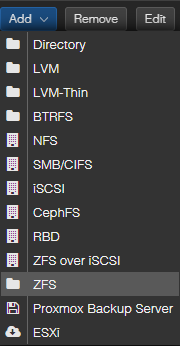
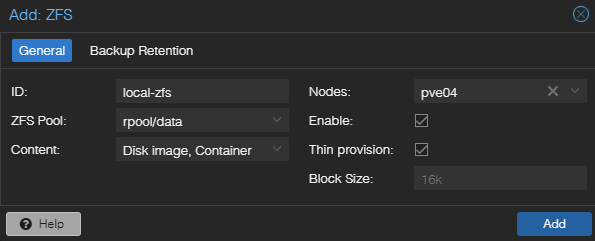
Typical configuration:
ID: local-zfs
ZFS Pool: rpool/data
Content: Disk image, Container
Nodes: Select only nodes with ZFS-storage
Enable: enabled
Thin provision: enabled
Nodes: <zfs-node-name>
The important part is the Nodes setting. The storage must only be assigned to the node where the pool exists. If the storage is assigned to multiple nodes that do not actually have that pool, migration and allocation errors will occur. Once the storage is added, it immediately becomes available for disk migration.
Summary
Introducing the first ZFS node into an existing LVM-based Proxmox cluster is straightforward but requires an explicit storage configuration step. Because Proxmox manages storage at the cluster level, the ZFS dataset must be added to the Datacenter storage configuration and restricted to the node where the pool exists. Once configured correctly, virtual machine disks can be moved from LVM to ZFS using the built-in storage migration tools.