
Proxmox Virtual Environment is one of the most widely used open-source virtualization platforms. With the release of Proxmox VE 9, administrators gain access to a newer technology stack, improved performance, and enhanced security features. This article documents an in-place upgrade from Proxmox VE 8 to Proxmox VE 9 as a practical experience report, explains what has changed, and highlights what to watch out for during the upgrade process.

The upgrade was performed in a cluster setup with multiple nodes, using local disks for virtual machines and LXC containers. No Ceph storage was involved. As a result, the steps and observations described here may differ when using Ceph or other storage and clustering technologies.
The upgrade was carried out node by node, with each host being evacuated beforehand. This approach proved to be reliable and resulted in a smooth and controlled upgrade process.
Why Upgrade to Proxmox VE 9
Updated Base System
Proxmox VE 9 is built on Debian 13 (Trixie) and ships with Linux kernel 6.14.8-2. Proxmox VE 8 was based on Debian 12 (Bookworm) and kernel 6.8. The newer base improves hardware compatibility, security, and overall system performance.
Snapshots for LVM Thick-Provisioned Storage
Virtual machines using shared LVM storage with thick provisioning can now be protected with snapshots. This closes a long-standing gap and significantly improves backup strategies in LVM-based environments.
- ZFS RAIDZ Expansion: Existing RAIDZ pools can now be expanded with additional disks while keeping downtime to a minimum. This is a major operational improvement for ZFS-based storage setups.
- Software-Defined Networking Enhancements: The new Fabrics feature enables more complex and scalable network topologies, including spine-leaf architectures. This makes Proxmox SDN more suitable for larger and structured environments.
- Improved High Availability Management: HA groups have been replaced with clearer and more flexible rules. Virtual machines and containers can now be controlled more precisely within high availability configurations.
- Updated Virtualization Stack: Proxmox VE 9 includes QEMU 10.0.2 and LXC 6.0.4, bringing stability improvements and new functionality across both virtual machines and containers.
- Web Interface Improvements: The web-based management interface has been refined, including better usability on mobile devices.
- Storage and Backup Improvements: Snapshot handling, backup options, and ZFS-related features have been further improved, making daily operations more efficient and reliable.
In-Place Upgrade from Proxmox VE 8 to Proxmox VE 9
Prerequisites
Before starting the upgrade, make sure the following requirements are met:
- Proxmox VE 8 is fully up to date, ideally version 8.4 or newer
- Complete and tested backups of all virtual machines, containers, and critical configuration files such as /etc/pve and /etc/network/interfaces
- For cluster and Ceph setups: Ceph must be on a compatible release (Ceph 19.2)
- Planned downtime, especially in clustered environments
- Console access via physical console, IPMI, IKVM, or SSH with a terminal multiplexer such as tmux or screen
Optional: Protecting the Session with Screen
Installing screen allows the upgrade process to continue even if the web interface or SSH session is interrupted.
apt install screen -y
screen -S proxmox-upgrade
screen -r proxmox-upgrade
To detach from the session, press CTRL + A followed by D.
Update Proxmox VE 8
Run the following commands on all nodes:
apt update
apt full-upgrade -y
reboot
After the reboot, verify the installed version:
pveversion
pve-manager/8.4.16/368e3c45c15b895c (running kernel: 6.8.12-16-pve)
The system should report at least version 8.4.1.
Run the Upgrade Check
Proxmox provides a pre-upgrade validation script:
pve8to9 --full

= CHECKING VERSION INFORMATION FOR PVE PACKAGES =
Checking for package updates..
PASS: all packages up-to-date
Checking proxmox-ve package version..
PASS: proxmox-ve package has version >= 8.4-0
Checking running kernel version..
PASS: running kernel '6.8.12-18-pve' is considered suitable for upgrade.

= CHECKING CLUSTER HEALTH/SETTINGS =
...

= SUMMARY =
TOTAL:    50
PASSED:   42
SKIPPED:  6
WARNINGS: 2
FAILURES: 0

ATTENTION: Please check the output for detailed information!
Resolve all reported issues such as disconnected storage or incompatible packages. Repeat the check until no critical warnings remain. A systemd-boot warning can be safely ignored.
Disable Old Repositories (Safer than Deleting)
Instead of removing the old Proxmox 8 repository files, move them to a backup folder so they are disabled but still recoverable:
mkdir -p /root/pve-repo-backup
mv /etc/apt/sources.list.d/pve-enterprise.list /root/pve-repo-backup/
mv /etc/apt/sources.list.d/pve-install-repo.list /root/pve-repo-backup/
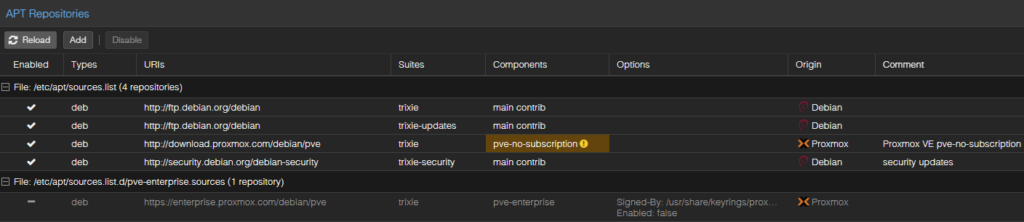
Note: During the Proxmox VE 9 upgrade, the pve-enterprise repository is always recreated and enabled automatically, regardless of the previous state.
If you do not have an active subscription, it should be disabled again manually after the upgrade.
Switch Debian Repositories from Bookworm to Trixie
Replace the Debian codename in all relevant repository files:
sed -i 's/bookworm/trixie/g' /etc/apt/sources.listIf the no-subscription repositories are used, adjust or comment them accordingly.
Upgrade the System
Refresh package lists and start the distribution upgrade:
apt update
Get:1 http://download.proxmox.com/debian/pve trixie InRelease [2,771 B]
Get:2 http://security.debian.org trixie-security InRelease [43.4 kB]
Get:3 http://ftp.de.debian.org/debian trixie InRelease [140 kB]
Get:4 http://download.proxmox.com/debian/pve trixie/pve-no-subscription amd64 Packages [302 kB]
Get:5 http://security.debian.org trixie-security/main amd64 Packages [97.9 kB]
Get:6 http://security.debian.org trixie-security/main Translation-en [62.5 kB]
...

apt dist-upgrade -y
During the process, configuration file prompts may appear. Review them carefully. In most cases, accepting the new version is recommended.
- Please select the layout matching the keyboard for this machine: German
- Configuration file ‘/etc/issue’: Y
- Services to restart for GNU libc library upgrade: postfix ssh cron
- Configuration file ‘/etc/lvm/lvm.conf’: N
Reboot and Verify
After the upgrade completes, reboot the system:
rebootVerify the installed version:
pveversion
pve-manager/9.1.4/5ac30304265fbd8e (running kernel: 6.17.4-2-pve)
The output should now show Proxmox VE 9.x. Disable the Enterprise repo if you use the community driven pve-no-subspription Repository.
Post-Upgrade Checks
After the upgrade:
- Verify cluster status and check all virtual machines and containers
- Review network and storage configurations for changes
- Validate backup jobs and storage definitions
- In clusters, migrate workloads to upgrade nodes one by one and avoid downtime
A full and tested backup remains mandatory. A test upgrade in a staging environment is strongly recommended.
Update Templates
After the Proxmox VE 9 upgrade, it is recommended to update the template repository to ensure all available OS templates are listed. This can be done with:
pveam updateOnce updated, you can check the available templates:
pveam available | grep almaBefore updating, only AlmaLinux 9 may appear:
system almalinux-9-default_20240911_amd64.tar.xzAfter the update, AlmaLinux 10 becomes visible:
system          almalinux-10-default_20250930_amd64.tar.xz
system          almalinux-9-default_20240911_amd64.tar.xz
To install AlmaLinux 10 on your Proxmox storage:
pveam download local almalinux-10-default_20250930_amd64.tar.xzlocalrefers to the Proxmox storage where templates are stored.- After the download completes, AlmaLinux 10 is ready to be used for creating virtual machines or LXC containers.
To verify the installation:
pveam list local
NAME                                                         SIZE
local:vztmpl/almalinux-10-default_20250930_amd64.tar.xz      79.46MB
AlmaLinux 10 should now appear in the list, confirming that the template is available and ready for use.
Troubleshooting
Every environment is different. Variations in hardware, system architecture, previously installed Proxmox versions, and upgrades performed during the system’s lifecycle make it impossible to predict which issues or warnings may occur during an upgrade, or which ones must be resolved beforehand.
Proxmox itself provides valuable guidance in this area, in some cases even through automated checks such as the upgrade checklist script. Nevertheless, the following sections only describe issues I personally encountered and should be understood as examples, not as a complete or universally applicable list.
FAIL: systemd-boot meta-package installed. This will cause problems on upgrades of other boot-related packages. Remove 'systemd-boot' See https://pve.proxmox.com/wiki/Upgrade_from_8_to_9#sd-boot-warning for more information.

# Fixed with:
# apt remove systemd-boot

WARN: Removable bootloader found at '/boot/efi/EFI/BOOT/BOOTX64.efi', but GRUB packages not set up to update it!
Run the following command:
echo 'grub-efi-amd64 grub2/force_efi_extra_removable boolean true' | debconf-set-selections -v -u
Then reinstall GRUB with 'apt install --reinstall grub-efi-amd64'

# Fixed with:
# echo 'grub-efi-amd64 grub2/force_efi_extra_removable boolean true' | debconf-set-selections -v -u
# apt install --reinstall grub-efi-amd64

...

= SUMMARY =

TOTAL: 50
PASSED: 40
SKIPPED: 5
WARNINGS: 1
FAILURES: 1

ATTENTION: Please check the output for detailed information!
Try to solve the problems one at a time and then run this checklist tool again.
apt remove systemd-bootecho 'grub-efi-amd64 grub2/force_efi_extra_removable boolean true' | debconf-set-selections -v -u
Then reinstall GRUB with 'apt install --reinstall grub-efi-amd64'Important Upgrade Considerations
- Backups are mandatory before starting the upgrade
- Network interface names may change and require manual adjustments
- GlusterFS is no longer supported and must be replaced
- The backup option maxfiles has been removed and existing configurations should be reviewed
- Cluster and HA configurations may require updates
- Third-party packages must be compatible with Debian Trixie
- Downtime must be planned, including reboots and potential manual steps
Conclusion
Upgrading to Proxmox VE 9 introduces meaningful improvements across storage, networking, high availability, and usability. While the migration requires careful preparation and planning, the benefits of a modernized platform, improved backup options, and enhanced performance outweigh the effort.
For administrators and organizations, upgrading to Proxmox VE 9 is a solid long-term investment in a secure and future-proof virtualization environment.