When running web applications behind NGINX on RHEL-based systems, cryptographic compatibility issues can occasionally cause application functions to fail, even when certificates and configurations are correct. One example is Wavelog, where synchronizing QSOs with the ARRL Logbook of The World (LoTW) may fail during the signing process with a Signing failed error.
This article explains how OpenSSL’s system-wide cryptographic security policy can prevent SHA-1 signing operations and how to resolve the issue by applying a dedicated OpenSSL configuration to PHP-FPM, without changing the global security policy.

Symptoms
The issue can occur with the following environment:
- RHEL-based systems
- Wavelog installed directly on the server
- nginx with PHP-FPM
- PHP 8.x
- OpenSSL 3.x
The LoTW Manual Sync operation fails with Signing failed
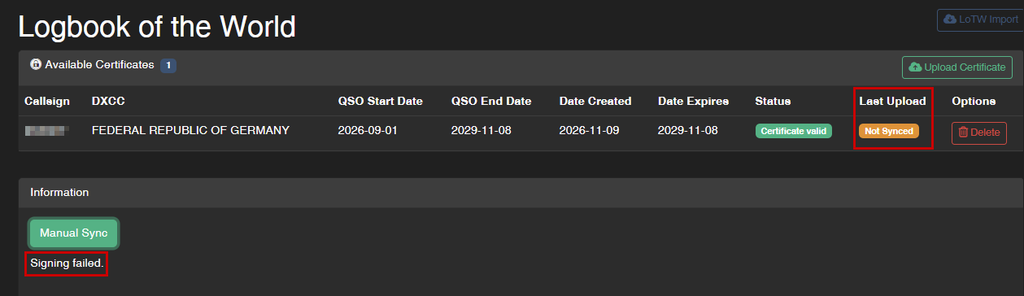
The LoTW certificate itself may be valid, and other Wavelog functions continue to work normally.
Why This Happens
Wavelog uses cryptographic signing when preparing LoTW uploads. On RHEL-based systems, including AlmaLinux 10, OpenSSL follows the system-wide cryptographic policy. SHA-1 signatures are restricted by default. Consequently, PHP’s OpenSSL extension may reject a signing operation using SHA-1, even though the required algorithm is available.
The relevant OpenSSL configuration property is:
rh-allow-sha1-signatures = yesEnabling this property allows SHA-1 signatures for the application using that OpenSSL configuration. Rather than weakening the security policy for the entire server, the solution is to apply this setting exclusively to PHP-FPM.
Checking the Problem
First, check the installed software versions:
cat /etc/os-release
php -v
openssl version
Check the active cryptographic policy:
cat /etc/crypto-policies/configOn a typical RHEL-based installation, the result is:
DEFAULTYou can reproduce the signing problem directly through PHP CLI:
php -r '
$k = openssl_pkey_new([
    "private_key_type" => OPENSSL_KEYTYPE_RSA,
    "private_key_bits" => 2048
]);
var_dump(openssl_sign("test", $sig, $k, OPENSSL_ALGO_SHA1));
'
If the operation returns an OpenSSL error such as:
bool(false)SHA-1 signing is being rejected. For comparison, SHA-256 signing can still work normally.
Applying the Fix
The solution is to create a dedicated OpenSSL configuration for PHP-FPM.
Create a Separate OpenSSL Configuration
Copy the existing system configuration:
cp -a /etc/pki/tls/openssl.cnf /etc/php-fpm-openssl.cnfAdd the SHA-1 property to the existing evp_properties section:
sed -i '/^\[ *evp_properties *\]/a rh-allow-sha1-signatures = yes' /etc/php-fpm-openssl.cnf💭 Note: Make sure the evp_properties section exists in the copied OpenSSL configuration. The sed command does not report an error if the section is missing, but the setting will not be added.
The resulting section should look like this:
[ evp_properties ]
rh-allow-sha1-signatures = yes
Test the new configuration using PHP CLI:
OPENSSL_CONF=/etc/php-fpm-openssl.cnf php -r '
$k = openssl_pkey_new([
    "private_key_type" => OPENSSL_KEYTYPE_RSA,
    "private_key_bits" => 2048
]);
var_dump(openssl_sign("test", $sig, $k, OPENSSL_ALGO_SHA1));
'
The expected result is:
bool(true)This confirms that the dedicated configuration permits SHA-1 signing.
Configure PHP-FPM
PHP CLI and PHP-FPM are separate processes. Therefore, setting OPENSSL_CONF for a CLI command does not automatically affect PHP-FPM.
Create a systemd drop-in directory:
mkdir -p /etc/systemd/system/php-fpm.service.dCreate the configuration file:
cat > /etc/systemd/system/php-fpm.service.d/openssl.conf <<'EOF'
[Service]
Environment="OPENSSL_CONF=/etc/php-fpm-openssl.cnf"
EOF
Reload systemd and restart PHP-FPM:
systemctl daemon-reload
systemctl restart php-fpm
This ensures that PHP-FPM starts with the dedicated OpenSSL configuration. All PHP applications running through this PHP-FPM service will use the modified OpenSSL settings.
Validating the Fix
Check whether systemd has applied the environment variable:
systemctl show php-fpm -p EnvironmentThe output should contain:
Environment=OPENSSL_CONF=/etc/php-fpm-openssl.cnfCheck the PHP-FPM service:
systemctl status php-fpm --no-pagerIt should report:
Active: active (running)Finally, open Wavelog and run:
LoTW → Manual Sync
The upload should now pass the signing stage without the Signing failed. error.

Verifying the Upload in LoTW
After completing the synchronization, you can also verify whether the upload was successful directly in LoTW. Log in to your ARRL LoTW account and navigate to Your Account → Your Activity. This page displays your recent activity and allows you to check whether the uploaded QSOs have been successfully received and processed.
Security Considerations
⚠Important: This solution avoids changing the global cryptographic policy. Instead, SHA-1 signing is enabled through a dedicated OpenSSL configuration assigned to PHP-FPM. All PHP applications running through this PHP-FPM service will use the modified configuration. Other system services and applications using the original OpenSSL configuration remain unaffected. SHA-1 is considered cryptographically weak and should not be used for new security-sensitive applications. This is a targeted compatibility workaround for the LoTW signing workflow.
This change affects all applications using the same PHP-FPM service and OpenSSL configuration, not just Wavelog. Keep this in mind if the server hosts additional PHP applications.